GFP Mobile Ticket App
UX Case Study
By Daniel Brouse
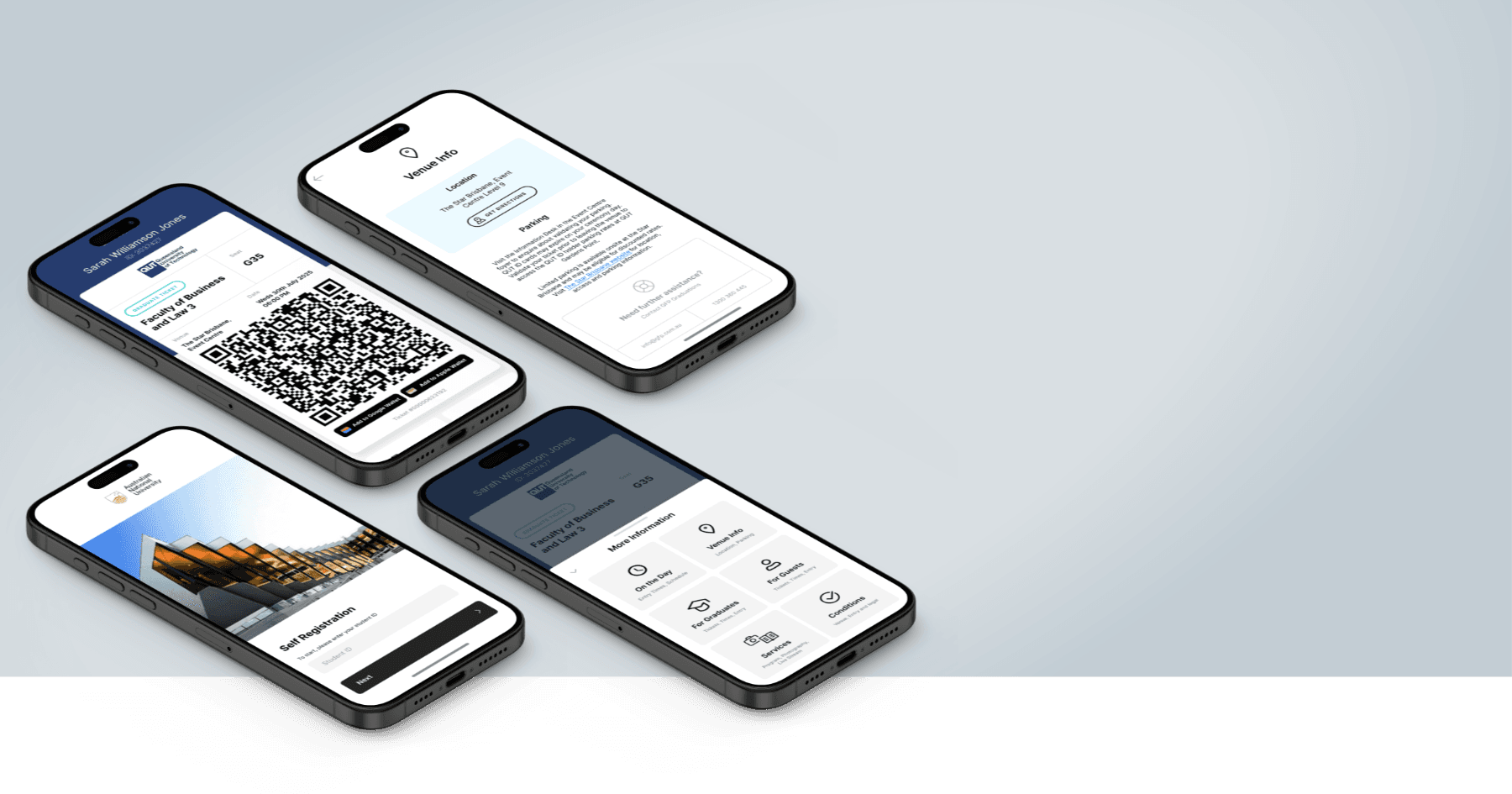
GFP Mobile Ticket App
UX Case Study
By Daniel Brouse
Project Overview
- Project Goal:
- Create a seamless ticketing experience enabling users to easily access and manage event tickets via mobile and web platforms.
- Client:
- GFP Designs
- My Role:
- UI/UX Designer / UX Lead
- Platforms:
- Mobile & Web
1. The Problem
GFP Designs provides graduation services for universities, including ceremony management, professional photography, and academic dress hire. One of the key touchpoints in this ecosystem is a mobile web app used by graduates and guests to register for a ceremony and access their digital ticket on the day.
Over time, this ticket experience had evolved organically as new features were added. While functionally complete, the experience had become increasingly difficult to use — particularly in the high-stress, time-poor context of graduation day.
Key issues identified by the client
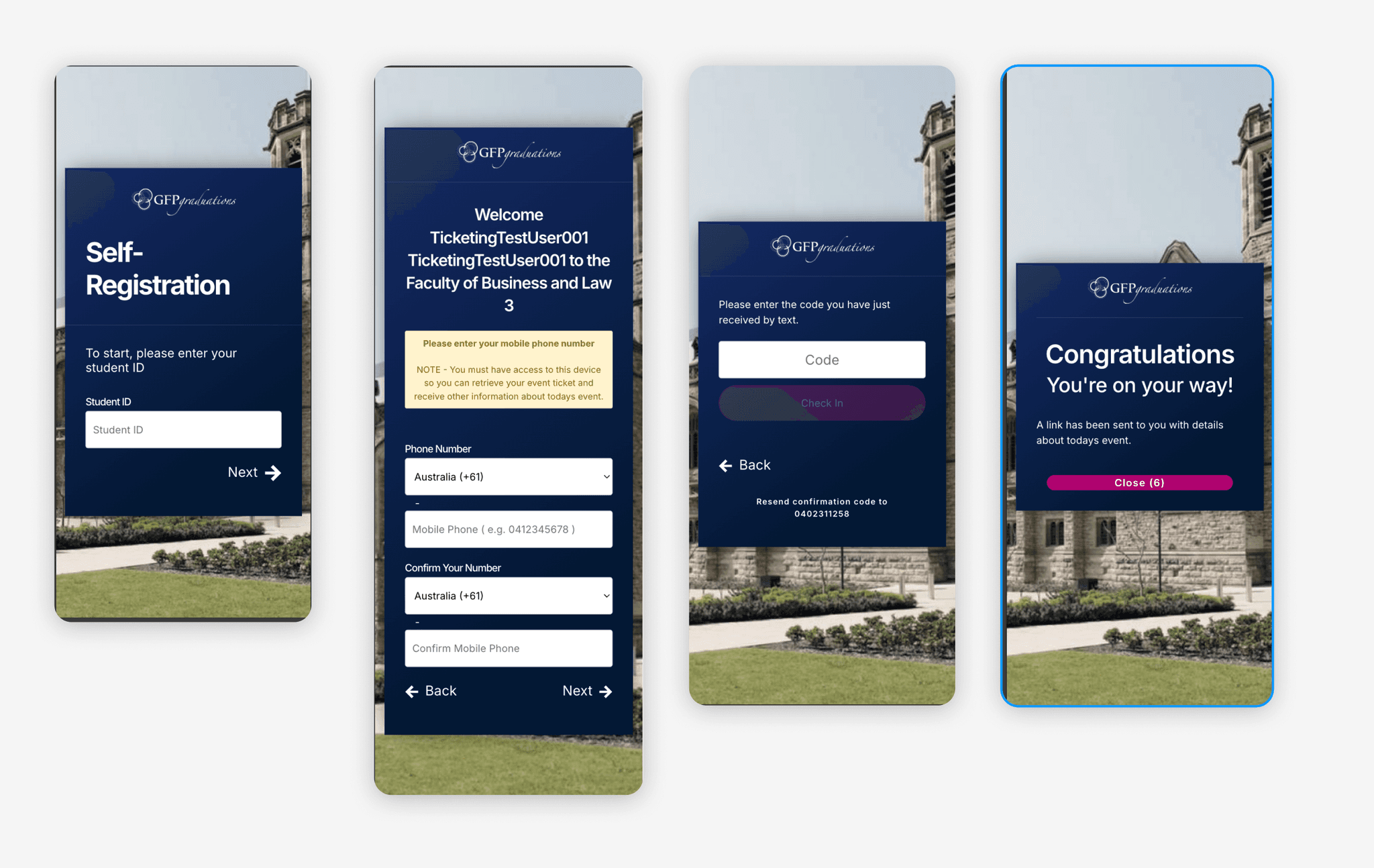
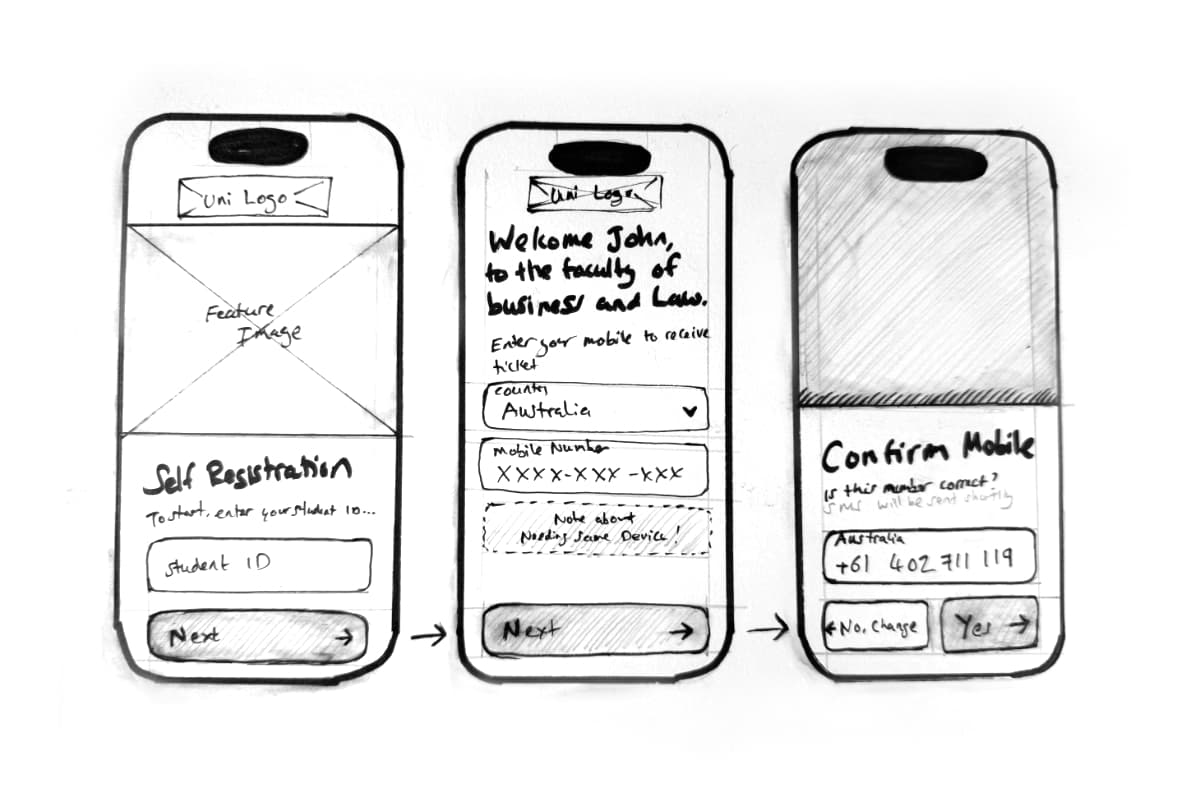
Self-registration (onboarding):
- Inconsistent and outdated UI, the result of incremental changes over several years
- Branding that prioritised GFP over the university, reducing student trust and recognition
- A registration flow that felt longer and more tedious than necessary
- Screens not optimised for mobile-first use
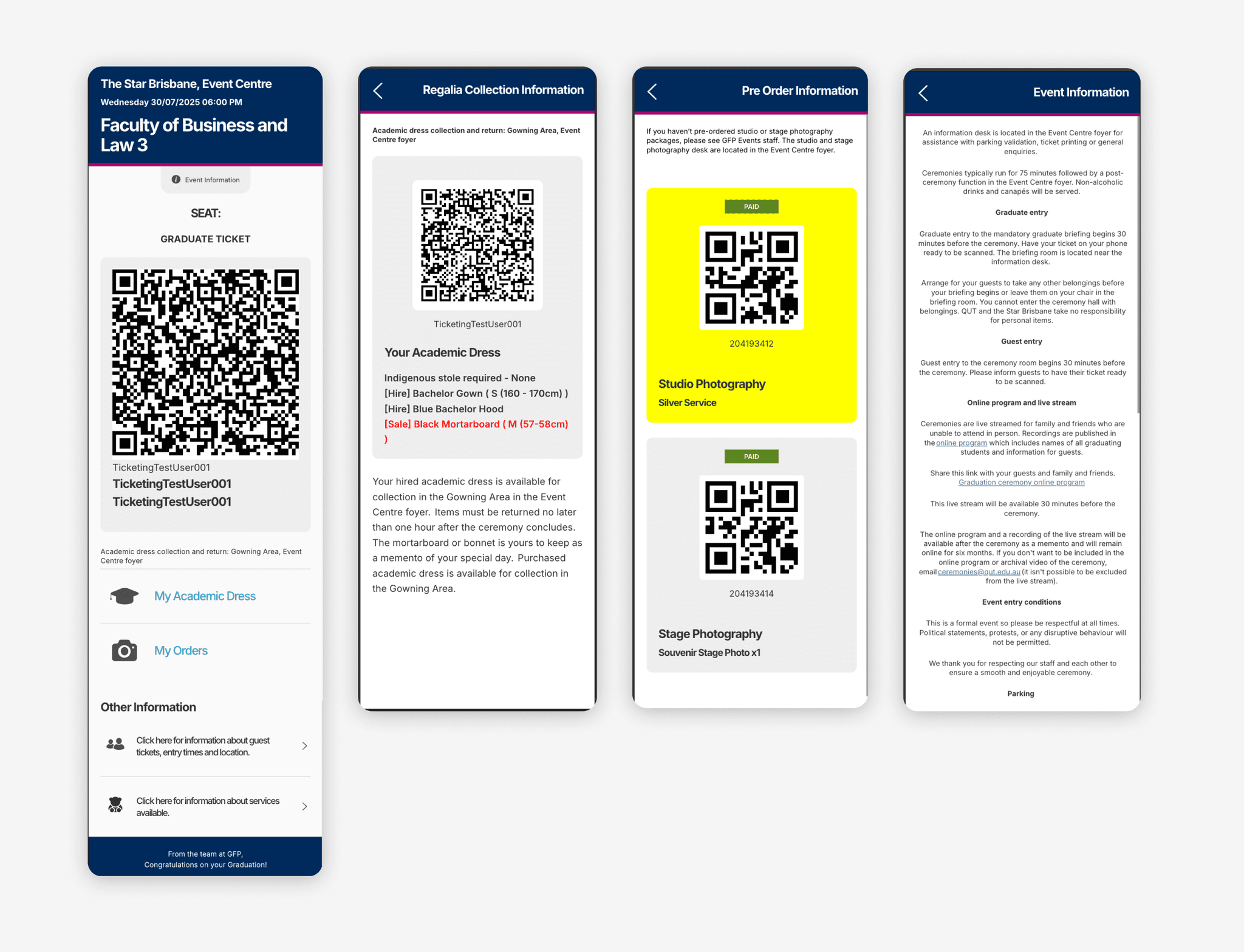
Digital ticket web app:
- Severe information overload on a single screen
- No clear visual hierarchy to guide attention
- Important features (e.g. *My Orders*, *Academic Dress*, venue details) were easy to miss
- The ticket did not visually resemble a “ticket”, creating uncertainty for both users and event staff
Impact
As a result:
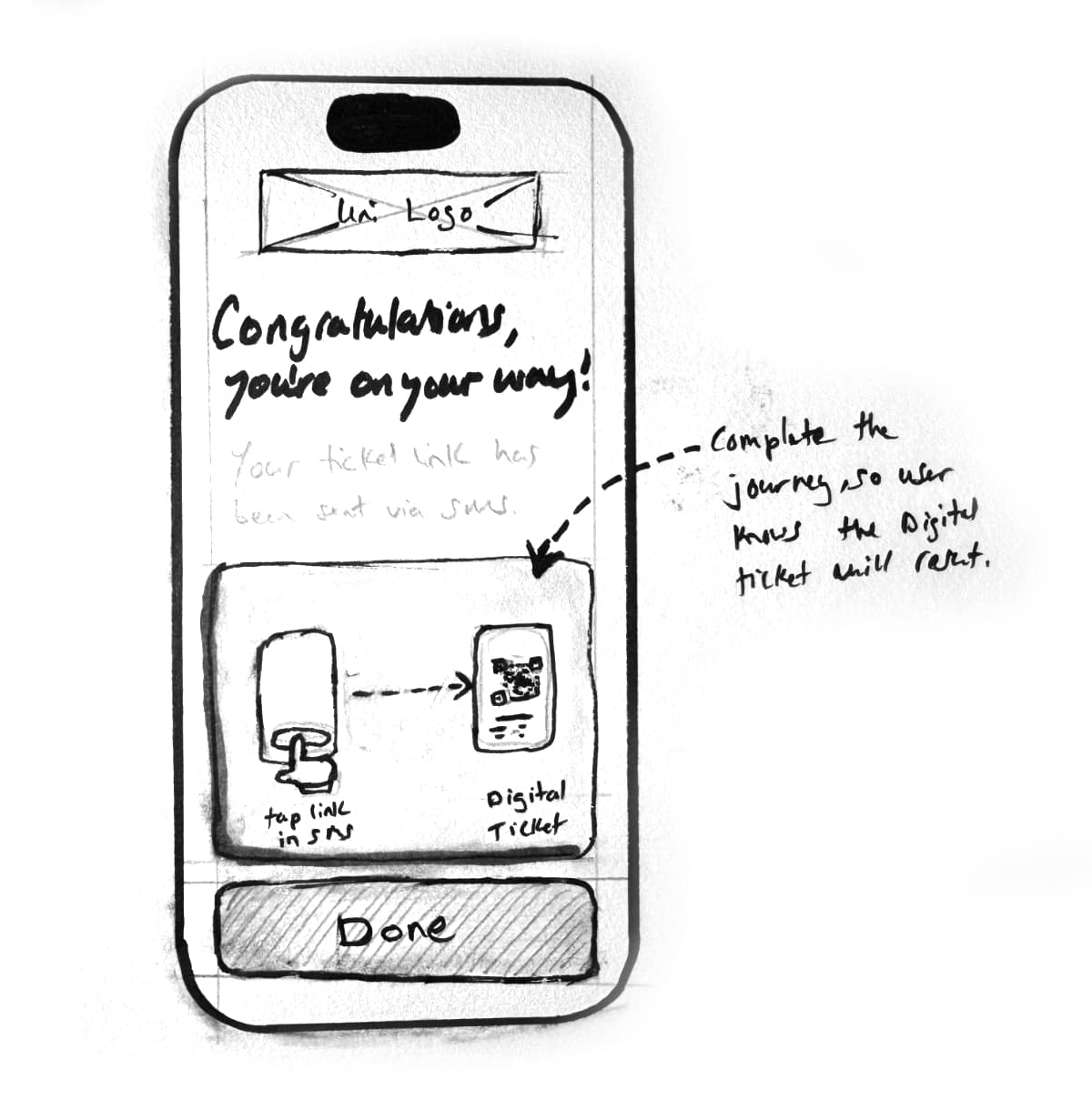
- Students were confused about how to retrieve and use their ticket
- Common questions led to increased support calls
- Guests and staff struggled to quickly identify ticket type and seating
- Valuable services and pre-purchased orders were frequently overlooked
- On the day of the ceremony, small UX issues compounded into delays and friction
Bringing Clarity
The challenge was not adding more functionality — it was bringing clarity, hierarchy, and confidence to an experience used under pressure, often with limited connectivity and little time for exploration.
Before
2. Goals & Success Criteria
Given the time-critical and high-pressure context of graduation day, the redesign focused on speed, clarity, and confidence of use rather than adding new functionality.
User Goals
Graduate Students
- Complete self-registration quickly and without confusion
- Clearly understand how to retrieve and use their digital ticket
- Instantly access essential information such as seat number, venue, and academic dress
Guests
- Easily access the ticket via a shared link
- Find ceremony details and optional services without being overwhelmed
Event staff
- Instantly identify ticket type (graduate / guest / staff)
- Quickly direct people to the correct seating or area
Business Goals
- Improve completion and success of student self-registration
- Reduce support enquiries related to tickets and ceremony information
- Increase visibility of services surfaced via the ticket experience
- Present a modern, university-aligned digital experience
Success criteria
The experience would be considered successful if:
- Users could understand their ticket at a glance
- Critical information was immediately visible without searching
- Secondary information was available without competing for attention
- The ticket worked reliably in low-connectivity environments
3. Users & Context
The digital ticket experience is used by multiple audiences, often under time pressure and environmental constraints. Understanding this context was critical in shaping both the structure and interaction design.
Primary user groups
Graduate students
- Primary goal is to graduate with minimal friction
- Time-poor and often distracted by ceremony preparation
- Need fast access to seat details, academic dress information, and existing orders
Guests (family and friends)
- Access the ticket via a shared link
- More likely to explore supplementary information and optional services
- Less familiar with ceremony logistics
Event staff
- Use the ticket as a quick verification tool
- Need to identify ticket type and seating information instantly
- Prioritise speed and clarity over feature depth
Usage context & constraints
- High cognitive load: users are often rushed or stressed on the day
- Limited or unreliable connectivity at large venues
- Mobile-first usage, often one-handed
- Shared access: the same ticket link may be used by multiple people
- Content constraints: ticket content is partially managed via a CMS with limited formatting control
These conditions reinforced the need for:
- Clear visual hierarchy
- Immediate access to critical information
- Reduced on-screen complexity
- Strong affordances for key actions
4. Key UX Problems Identified
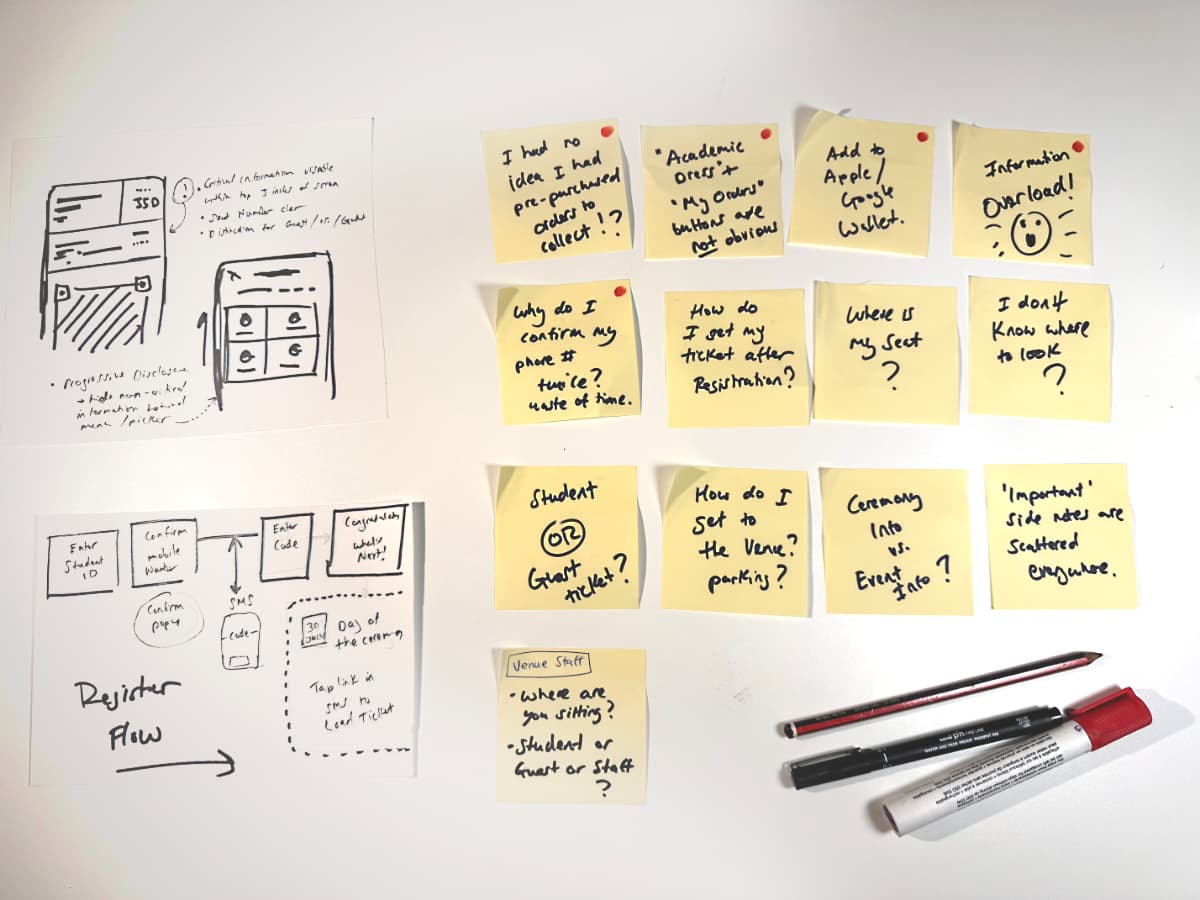
User interviews and usability testing surfaced consistent pain points across graduates, guests, and event staff. While the issues varied in detail, they clustered around a small number of core UX failures.
Selected user quotes
I don't know where to look — there's too much going on.
I had no idea I had pre-purchased orders to collect.
Academic dress and My Orders weren't obvious to me.
Is this my ticket or my mum's ticket?
It doesn't look like a ticket — it looks like a broken webpage.
Graduate or guest? Where are you sitting?
— Event staff
Key problems to address
1. Lack of visual hierarchy
- Critical information (seat, ticket type, QR code) did not stand out
- Users were unsure where to focus their attention
2. Information overload
- Too much content presented on a single screen
- Important details competed with secondary and tertiary information
3. Poor information architecture
- Related content was not grouped logically
- Key features (e.g. My Orders, Academic Dress) were easy to miss
4. Unclear mental model
- The interface did not resemble a recognisable "ticket"
- Users and staff lacked confidence in what they were viewing
5. Error-prone shared usage
- No clear distinction between graduate, guest, and staff tickets
- Increased friction for event staff during check-in and seating
5. UX Strategy & Design Principles
Based on the research findings and real-world constraints, the redesign focused on a small set of guiding principles to drive consistent decision-making across the experience.
Core UX principles
1. Design for clarity under pressure
Users should understand their ticket and next step at a glance, even in stressful or time-poor situations.
2. Prioritise what matters most
Surface only critical information upfront; defer secondary and tertiary content through progressive disclosure.
3. One primary task per screen
Avoid competing actions. Each screen or section should have a clear purpose and dominant action.
4. Reinforce familiar mental models
The interface should clearly resemble a recognisable "ticket" to build trust and confidence for users and staff.
5. Make key actions impossible to miss
Important features (e.g. My Orders, Academic Dress) must look and behave like buttons, not content.
6. Task Flows & Information Architecture
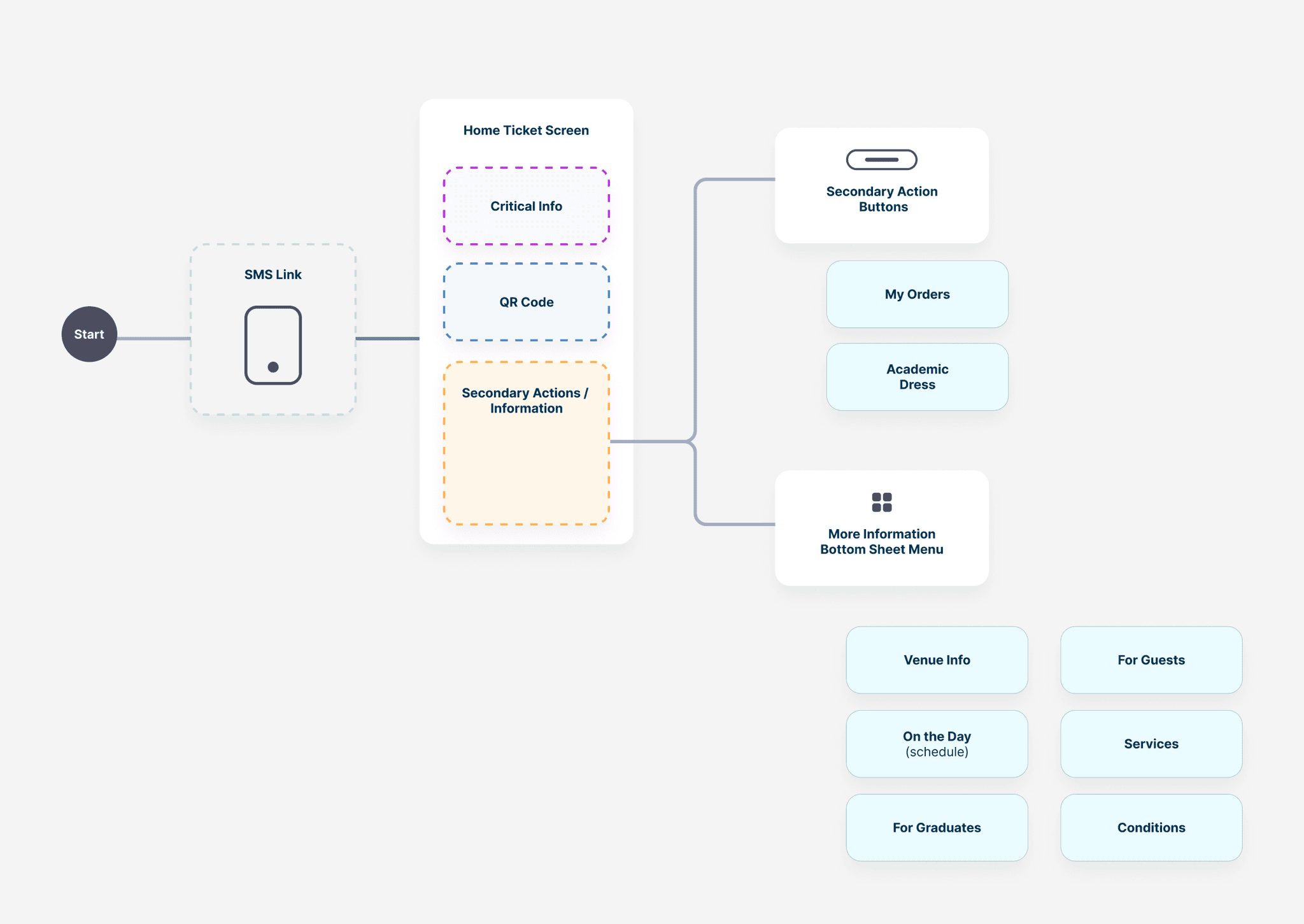
To address the identified UX issues, the experience was reorganised around clear user tasks rather than system-driven content.
Primary user tasks
- View ticket details quickly
- Access orders and entitlements
- Present ticket for scanning
- Find event-specific information (e.g. academic dress, venue details)
Structural changes made
- Flattened navigation to reduce cognitive load
- Grouped related information into clearly named sections
- Promoted high-frequency tasks (e.g. My Orders) to top-level visibility
- Reduced screen switching by consolidating key actions into fewer views
Resulting IA approach
- Fewer entry points
- Clear hierarchy of importance
- Predictable locations for critical information
7. Key Design Solutions
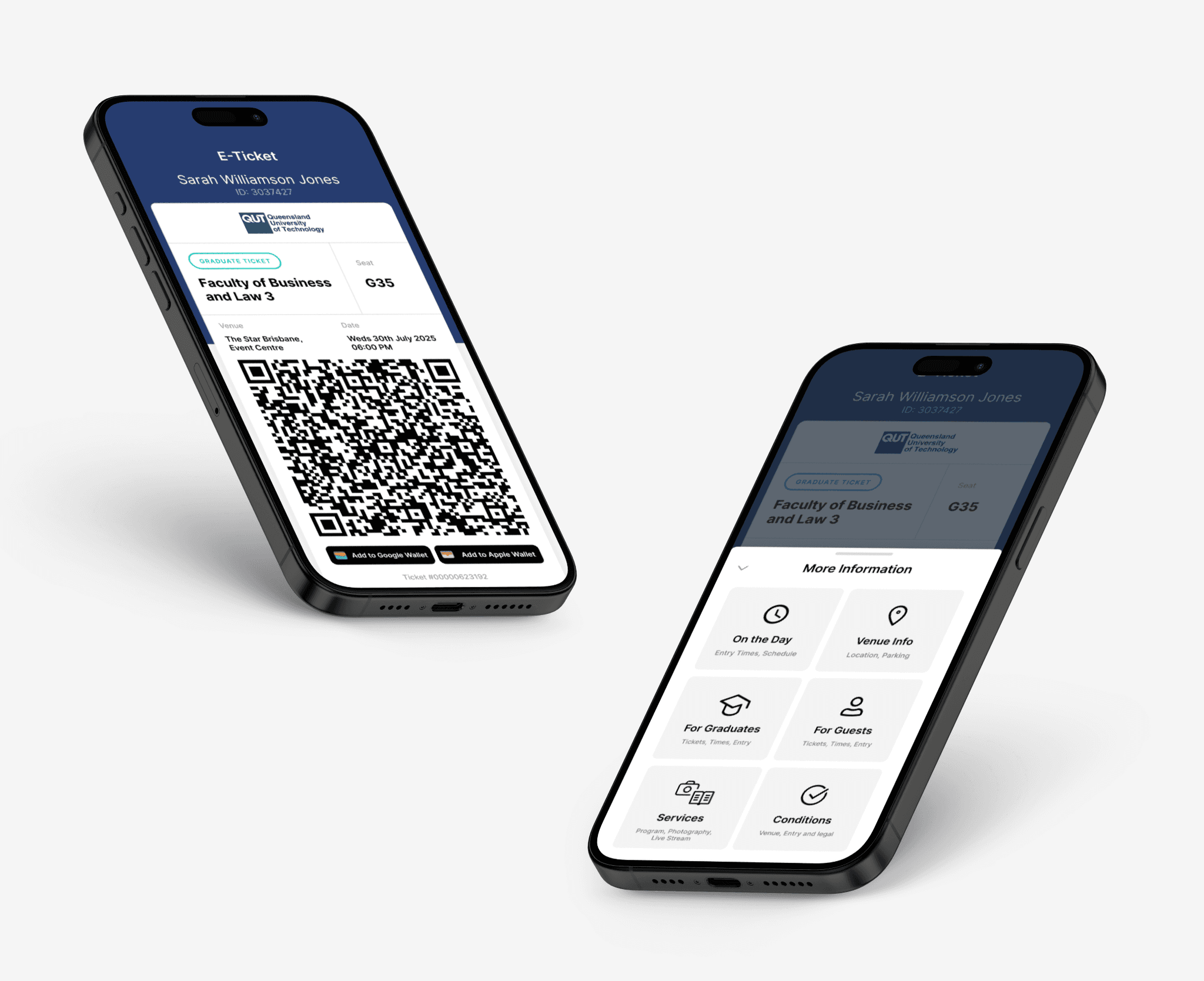
The final designs focused on clarity, confidence, and speed, ensuring users could complete critical tasks with minimal effort.
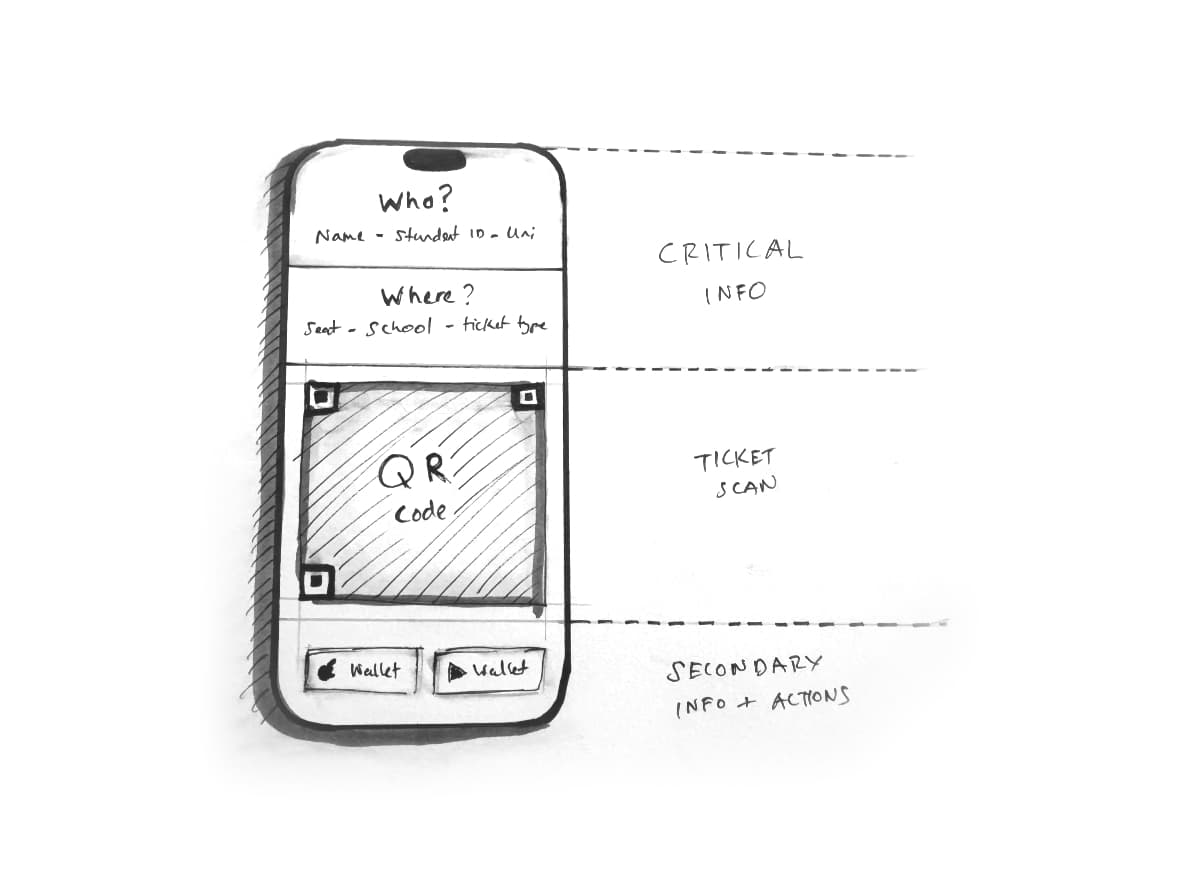
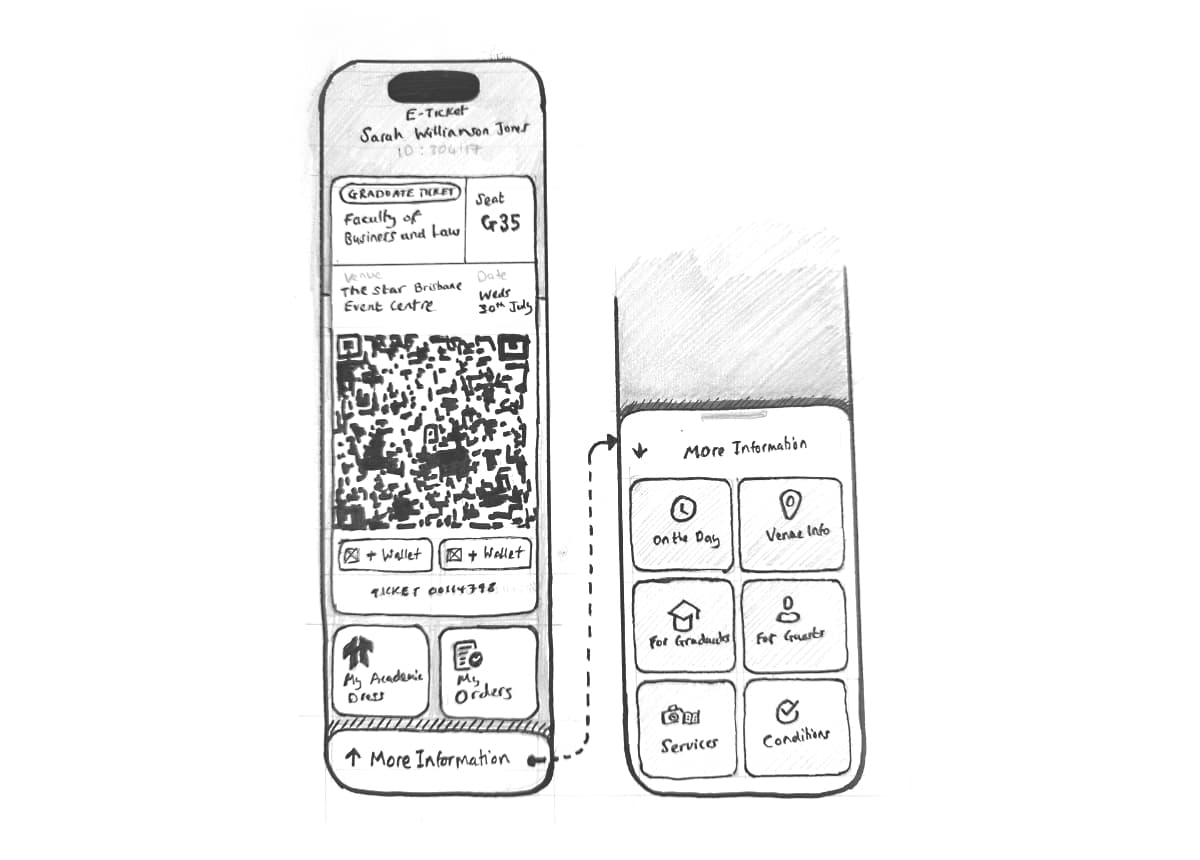
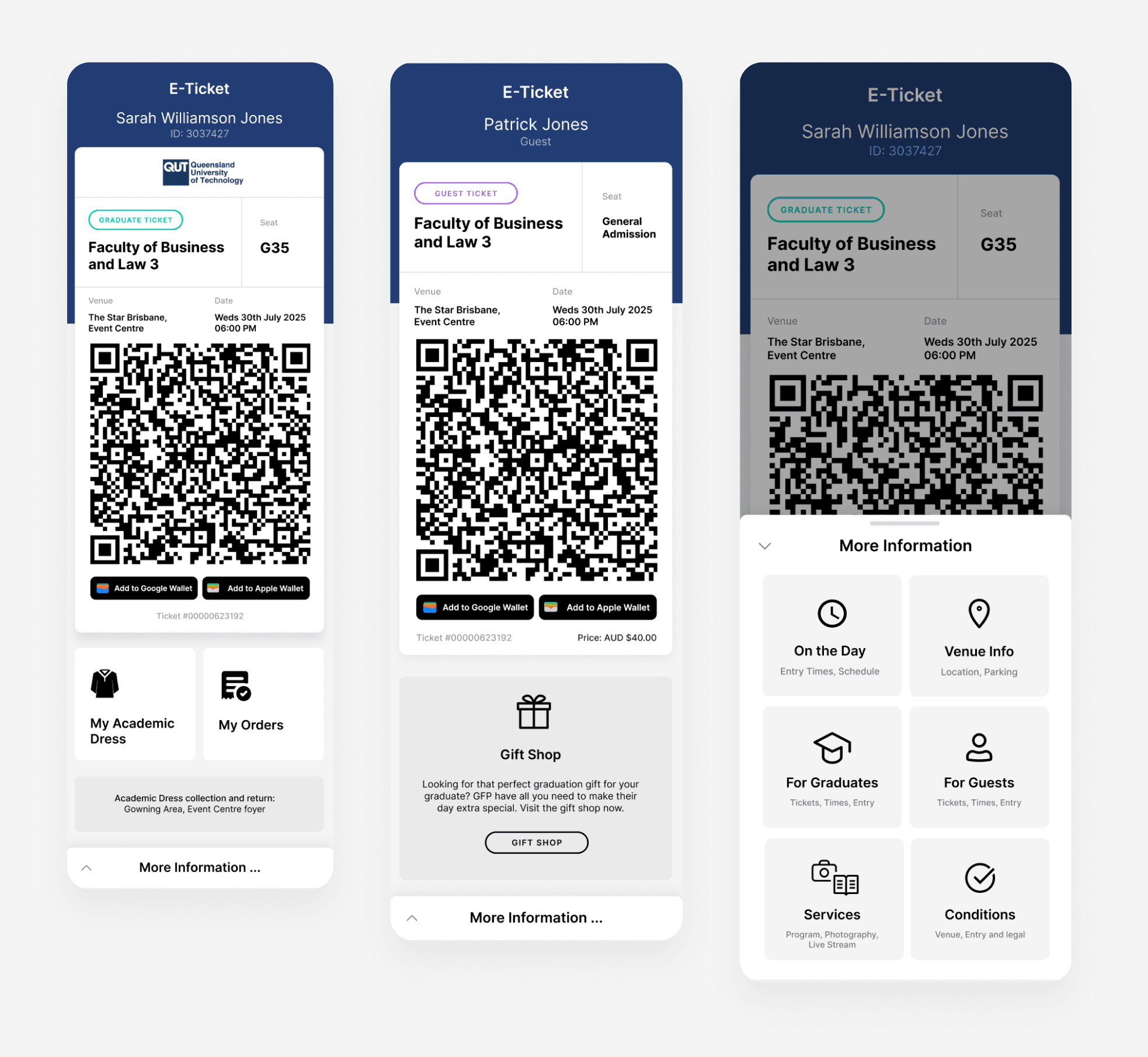
1. Simplified Ticket View
- Clear visual hierarchy prioritising event name, date, and ticket status
- Reduced visual noise to support fast scanning at venues
- Key actions (e.g. View Ticket, Present QR) placed prominently
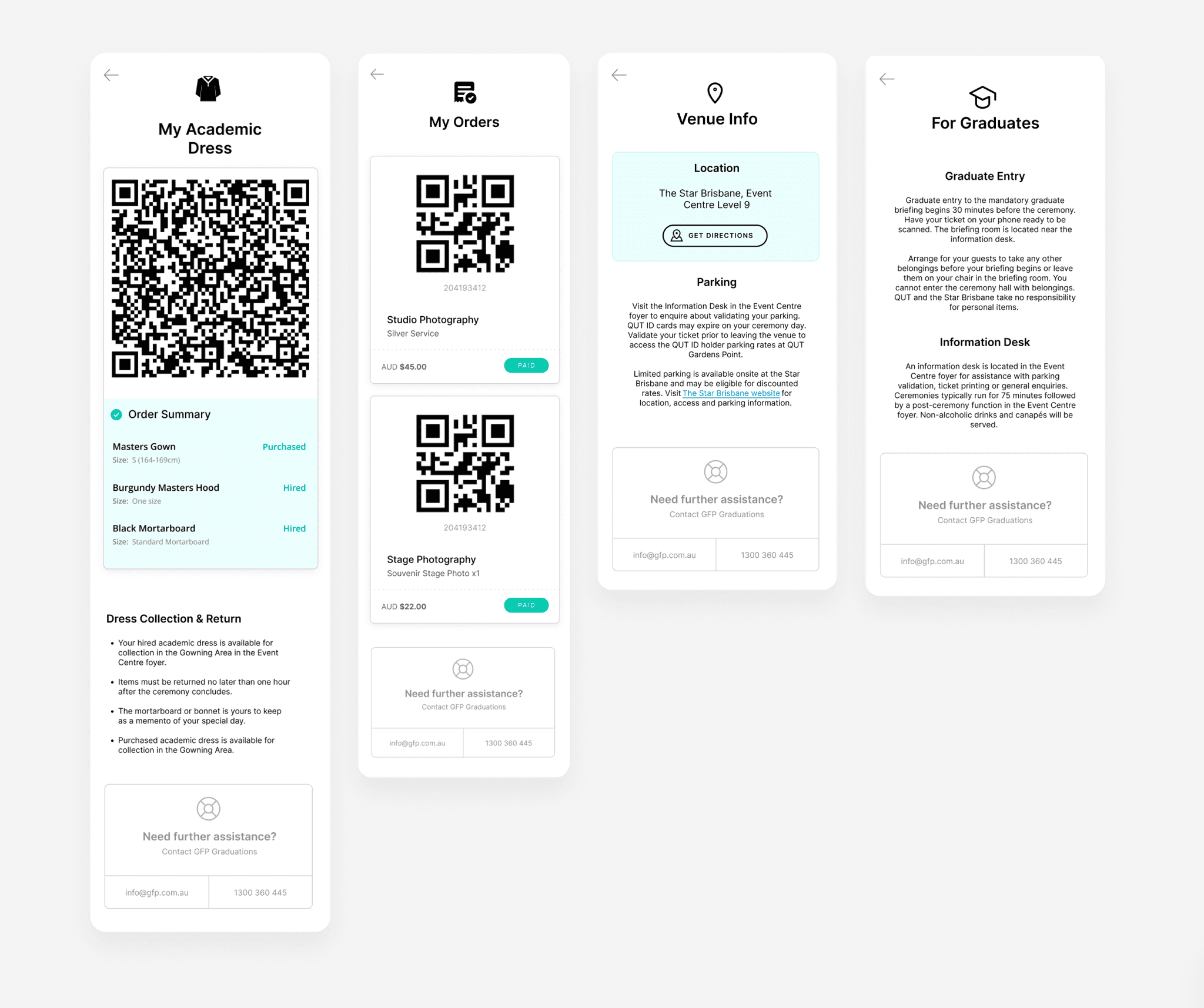
2. Orders-Centred Navigation
- Reframed the experience around "My Orders" rather than system categories
- Each order acts as a single source of truth for tickets, entitlements, and event info
- Reduced confusion around "where things live"
3. Contextual Information Grouping
- Event-specific details (e.g. academic dress, venue instructions) shown only when relevant
- Prevented users from being overwhelmed by unnecessary information
- Supported "just-in-time" understanding
4. Clear States & Feedback
- Strong visual cues for ticket status (valid, upcoming, used)
- Immediate feedback after key actions to reinforce confidence
- Reduced anxiety in high-pressure moments (e.g. event entry)
8. Validation, Outcome & Learnings
Validation & Feedback
Designs were validated through internal reviews and targeted user feedback sessions.
Early testing confirmed that users could find tickets faster, better understood where information lived, and felt more confident using the product in time-sensitive situations.
Key signals included:
- Fewer clarification questions around ticket access
- Faster task completion during walkthroughs
- Positive feedback on clarity and reduced cognitive load
Outcome & Impact
The redesigned experience delivered a more intuitive, user-centred flow that aligned with real user mental models.
Key outcomes:
- Clearer ownership of tickets and orders
- Reduced friction at critical moments (e.g. event entry)
- Stronger foundation for future feature growth
The solution balanced business requirements with user needs while maintaining team alignment and delivery momentum.
Learnings
- Mental models matter more than structure — naming and framing had a bigger impact than layout alone
- Reducing choice builds confidence, especially in high-pressure contexts
- Designing for edge cases early prevents downstream complexity
This project reinforced the value of focused UX strategy, tight collaboration, and designing with real-world use in mind.
Final Thoughts
This project reinforced why strong UX isn’t about adding more — it’s about removing friction, clarifying intent, and supporting users at the moments that matter most. While there are always opportunities to iterate further and test more deeply, the improved flow, clearer structure, and positive user feedback confirmed that the core experience is moving in the right direction.
Looking ahead, future iterations could build on this foundation through deeper user validation, expanded edge-case testing, and continued refinement as user needs evolve. Ultimately, delivering a product that users trust, understand, and feel confident using is what great UX is all about — and this project was a meaningful step in that direction.